
What's impossible?
I think there is no impossible thing. It is in ourself whether it makes possible.
The meaning is completly changed if we add '(single quotation mark) into the word of "Impossible".
"I'm possible with you". Let's find what we can.
In this article,
We would like to focus on the way to check IP port which is being used for specific process.
First of all,
For checking the port status, we need to use "netstat" can show network statistics because we can get the IP & Port statistics of specific process on the basis of the result.
1) How to use netstat(Network Statistics Monitoring tool)
Basically, netstat has many arguments for differernt operation.
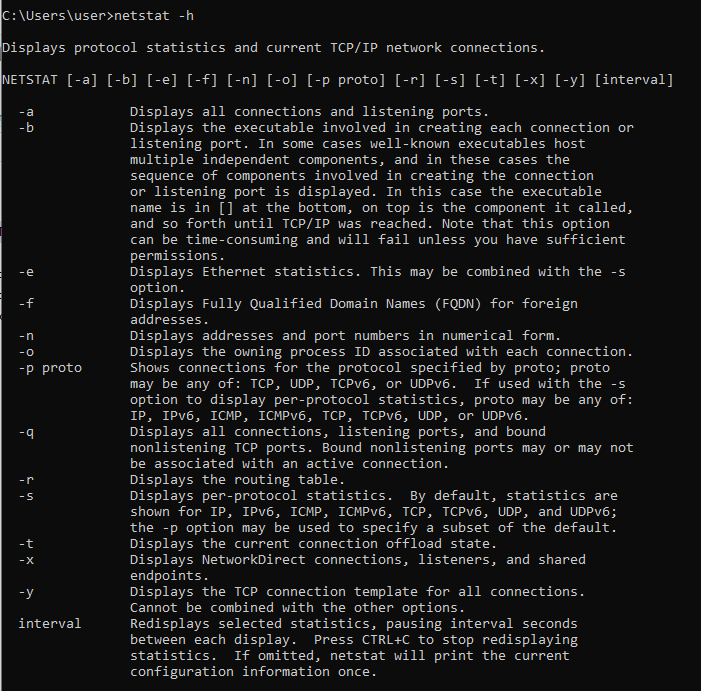
* Used argument
-a : Displays all connections and listeninig ports.
-n : Displays addresses and port numbers in numrical form
-o : Displays the owning process ID associated with each connection.
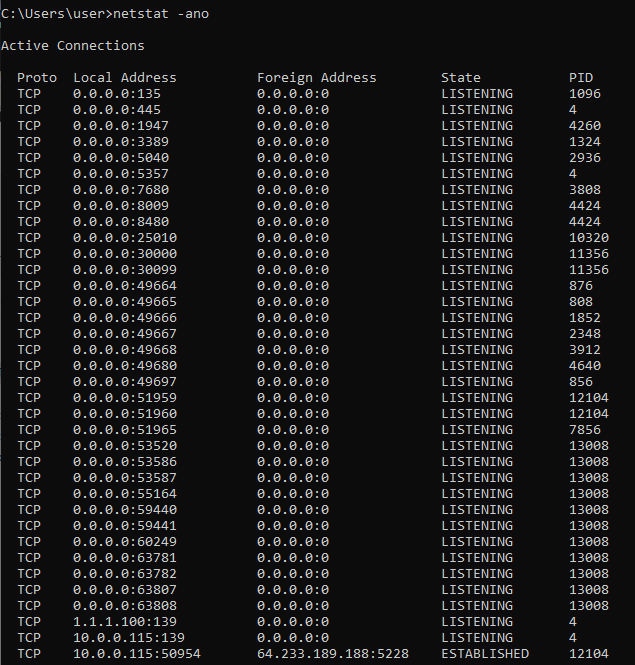
2) How to check process name by PID
Then, we need to find out process name with the information we have obtained from "netstat -ano".
We have to check process name by PID.
a) Windows OS - Task Manager
PID, Process Name is not displayed on the list because of default setting of task manager.

So, We need to enable "PID", "Process name" column to be shown on the list.

Now, you can check "PID" and "Process name"
As a practics, I would like to get the IP and port information which is being used for "KakaoTalk" application.
The PID is assigned as "16448".

We can acquire the IP and port information by checking each row with the PID (16448).

The reason that it is important to check IP & port status is due to that some server application or web which need to use specific port sometimes goes to abnormal operation status because of confliction of IP/Port.
3) How to make C# code to check the sequence
a) netstat automation using by System.Diagnostics.Process
redirected output data need to be parsed as specific pattern and Regular expression will be one of candidates to parse the output in my case.
Regarding Regular Expression, I will make it as new one that separated from this article soon.
        public List<string> GetNetStatPorts()
        {
            List<string> FormattenInfo = new List<string>();
            try
            {
                using (Process p = new Process())
                {
                    ProcessStartInfo ps = new ProcessStartInfo();
                    ps.Arguments = "-a -n -o";
                    ps.FileName = "netstat.exe";
                    ps.UseShellExecute = false;
                    ps.CreateNoWindow = true;
                    ps.WindowStyle = ProcessWindowStyle.Hidden;
                    ps.RedirectStandardInput = true;
                    ps.RedirectStandardOutput = true;
                    ps.RedirectStandardError = true;

                    p.StartInfo = ps;
                    p.Start();

                    StreamReader stdOutput = p.StandardOutput;
                    StreamReader stdError = p.StandardError;

                    string content = stdOutput.ReadToEnd() + stdError.ReadToEnd();
                    string exitStatus = p.ExitCode.ToString();

                    if (exitStatus != "0")
                    {
                    }

                    List<string> rows = Regex.Split(content, "\r\n").ToList<string>();

                    int index = rows.FindIndex(s => Regex.IsMatch(s, ".*프로토콜.*로컬 주소.*외부 주소.*상태.*PID.*"));
                    rows.RemoveRange(0, index+1);

                    foreach(string eleC in rows)
                        FormattenInfo.Add(getRequiredNetStateInformation(eleC));
                }
            }
            catch (Exception ex)
            {
                Console.WriteLine(ex.Message);
            }
            return FormattenInfo;
        }
b) check process by PID
After getting Process object by PID, you can check it only or you can expand to do more things such as process kill, etc.
    public Process ProcessInfo(int pid)
    {
        Process s_Proc;

        try
        {
            s_Proc = Process.GetProcessById(pid);
        }
        catch (Exception)
        {
            s_Proc = null;
        }
        return s_Proc;
    }
* Example use case (netstat, process)
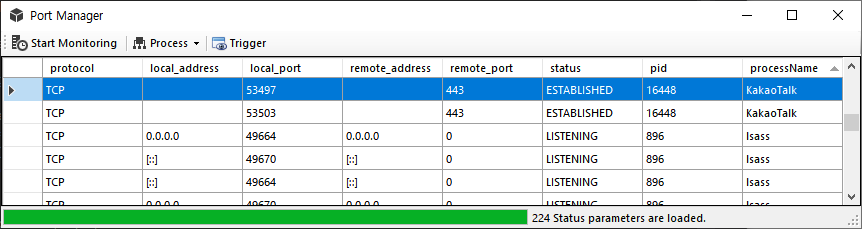
This is just one of examples to control process with checking IP port status.
I think there are any other efficient ways has more compatibility and flexibility than this approach.
I hope you can understand that the purpose of this activities and the insight, it is for working more smart without the barrier of thinking.
'Programming > .Net' 카테고리의 다른 글
| [.Net] Trigger Window Event Hook Message (0) | 2022.03.19 |
|---|---|
| [.Net] RTSP(Real Time Streaming Protocol) Live streaming (0) | 2022.03.19 |
| [.Net] Use cases of Regular Expression (0) | 2022.03.19 |
| [.Net] NetGear Hub Reboot using by Web-Crawling (0) | 2022.03.15 |
| [.Net] List/Array Data Control using by Linq (0) | 2022.03.15 |